Introduction
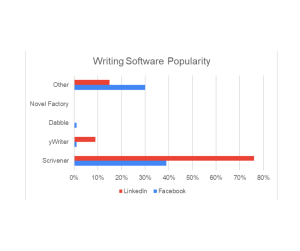
For any writer, choosing the right software is more than just a technical decision — it’s about shaping your creative process. Beyond Microsoft Word, Google Docs, and LibreOffice, the right tool can keep ideas organized, streamline drafting, and even motivate you to write more. To explore what authors actually use, I ran an informal poll across Facebook and LinkedIn in various author groups. The results reveal both a dominance of one well-known program and the surprising diversity of tools that writers actually rely on. My poll included Scrivener, yWriter, Dabble, and the Novel Factory; however, the responses pointed toward a much wider variety of writing software with the popularity of the “other” category.
Let’s examine the varying reasons why an author chooses to use writing software in the first place. I included some of the “other” software that authors mentioned in the following breakdown.
1. Organization and Structure
- Managing big projects: Tools like Scrivener and yWriter allow writers to break a manuscript into chapters or scenes, making it easier to rearrange and refine.
- Outlining and plotting: Many programs provide corkboards, index cards, or timeline views that help authors visualize story arcs.
- Research integration: Writers can keep notes, references, and drafts in one workspace instead of juggling multiple files.
2. Productivity and Focus
- Distraction-free environments: Apps like Ulysses or Obsidian offer minimalist interfaces that keep writers focused on words instead of formatting.
- Goal tracking: Some programs let writers set word count goals and track daily progress, which helps build consistency.
- Cloud syncing: With tools like Dabble or Google Docs, writers can pick up where they left off across devices.
3. Collaboration and Sharing
- Real-time collaboration: Google Docs and Word (with OneDrive) make it easy for co-authors, editors, or beta readers to give feedback instantly.
- Export and formatting options: Programs like Atticus or Scrivener export to ebook, print-ready, or screenplay formats, saving writers time at the publishing stage.
4. Specialization for Genres and Formats
- Screenwriters use Final Draft for its industry-standard formatting.
- Novelists lean toward Scrivener or Dabble for scene and character management.
5. Editing and Improvement
- Style and readability: Hemingway Editor helps tighten prose by highlighting complexity and passive voice.
- Grammar and polish: Grammarly assists with correctness and tone, reducing the workload before professional editing.
6. Psychological Benefits
- Sense of control: Having everything organized in one tool reduces stress.
- Motivation: Features like progress bars or achievement badges (in some apps) keep writers engaged.
So which is the best writing software in 2025?
The initial takeaway from the poll is that Scrivener remains the go-to tool for serious novelists and long-form writers. Its chapter and folder system is particularly beloved:
One Facebook author commented, “I love the book and chapter folders and being able to move things around without losing track.”
Scrivener’s flexibility in handling sprawling manuscripts, combined with tools for research, notes, and exports, keeps it at the top of the list for many professional and aspiring authors.
Second place?
Scrivener was the top choice among LinkedIn users, with more than three-quarters of respondents preferring it over alternatives. On Facebook, however, the picture looked different. The vast majority selected “other,” and using comments, revealed a wide mix of tools outside of my listed options. Some notables were Microsoft Word and Google Docs, Notion, Novlr, Obsidian, Plottr, NovelPad, and Grammarly.
- Microsoft Word & Google Docs: Still the backbone of writing for countless authors, thanks to their ubiquity and strong collaboration features.
- Notion Writers can outline, draft, track research, manage characters, and organize scenes—all in one place. Increasingly popular among bloggers, essayists, and non-fiction writers who need integrated note-taking and research alongside their drafts.
- Obsidian Used for knowledge-heavy writing—Research papers, long-form essays, and non-fiction where linking ideas is essential. Can also be used for long-term personal knowledge management—capture ideas, journal, track progress, and connect thoughts over time.
- Novlr Offers a minimalist interface on a browser-based platform; you can break larger manuscripts into chapters and keep separate sections for characters, plot, and research—ideal for novelists; Novlr is unique in being writer-owned, users can influence its development and even receive profit sharing.
- NovelPad A polished, user-oriented writing platform combining drafting, planning, editing, and analytics into one cohesive ecosystem.
- Ulysses (Mac/iOS only): A minimalist, distraction-free tool beloved by Apple users who prefer clean design; Ulysses stands out as a powerful, elegant writing tool for authors, bloggers, and long-form writers on Apple devices.
- Atticus An emerging all-in-one platform for indie authors, combining writing with formatting and publishing tools; Atticus is a streamlined tool that handles both book design and drafting.
- Plottr Excels as a dedicated visual plotting tool, perfect for organizing complex plots, building story bibles, and planning book series. While it doesn’t function as a drafting platform, its clarity, usability, and export capabilities make it a powerful complement to writing tools like Scrivener or Word.
- Final Draft The industry standard for screenwriters, with formatting and collaboration features designed for film and television.
- Hemingway Editor & Grammarly While not standalone writing platforms, these editing tools are now integral to many writers’ workflows for improving clarity and grammar.
The diversity of these tools underscores the fact that “writing software” doesn’t mean the same thing to everyone. Some need complex plotting capabilities; others just want a blank page.
The reality is that no single program serves all writers equally.

How to Choose the Best Writing Tool
When choosing your writing software, consider:
– Complexity: Do you need robust outlining and research tools? Scrivener or Dabble might fit.
– Collaboration: Writing with others? Google Docs or Word remain hard to beat.
– Specialization: Screenwriters will benefit from Final Draft, while novelists may lean toward Scrivener.
– Simplicity: Prefer distraction-free drafting? Tools like Ulysses or Obsidian may be your choice. Or maybe you prefer the blank page of Word or GoogleDocs.
This difference highlights an important truth about writing software: no single program dominates every community. Writers’ choices often reflect not just features, but also genre, workflow, and even the platforms they spend their time on.
The best software is the one that helps you sit down and write consistently.
Conclusion
My poll showed Scrivener’s strength among LinkedIn writers and an overwhelming variety of “other” tools among Facebook respondents. One thing is clear: there is no single “best” writing software. Instead, there are many paths to productivity, each shaped by the writer’s style, genre, and goals.
The key is experimentation. Try a few tools, see which feels natural, and build your workflow around it. If you have any other software that you’d like to mention, feel free to leave a comment. And if you’ve finished your novel and you are ready to take the next step towards publication, check out my editing services.
0 Comments